Profiles
PyVRP supports routing problems with multiple vehicle types. These vehicle types can differ in many ways, some of which we have already seen in previous tutorials. Another way in which vehicle types can differ is in the distances and durations of the paths they need to travel between locations.
In this notebook we explore PyVRP’s routing profiles, which can be used to model these differences. Each profile corresponds to a pair of distance and duration matrices. The profile feature is particularly helpful for problems with mixed fleets of trucks, cars, or bicycles, as well as access restrictions.
[1]:
import matplotlib.pyplot as plt

import pyvrp
import pyvrp.plotting
import pyvrp.stop
Access restrictions
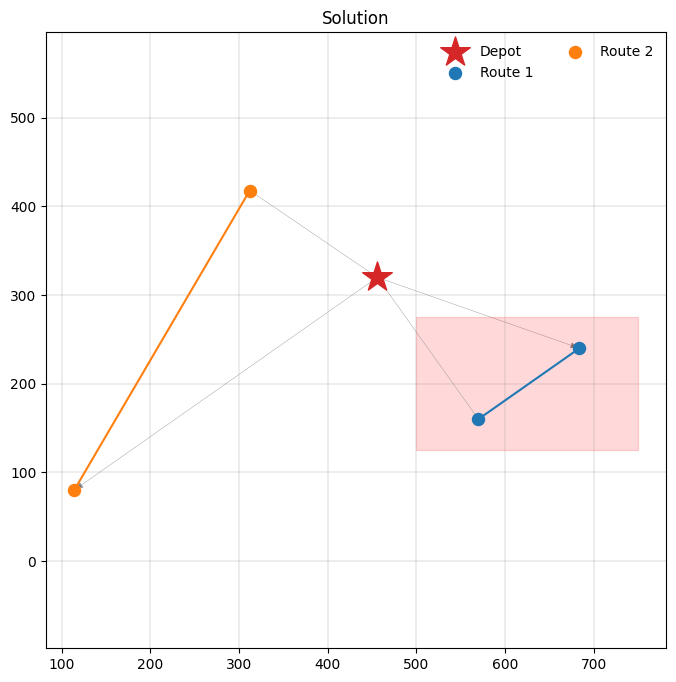
Access restrictions commonly apply in urban environments with emission zones, where several types of (heavy) trucks may not enter. We will add one regular vehicle type to the model that can enter the restricted zone, but is more expensive to operate with a higher unit_distance_cost. Additionally, we will consider a vehicle type that cannot enter the restricted zone, but is far cheaper.
Suppose we have a rectangular zone defined by the following (x, y) coordinates.
[2]:
ZONE = ((500, 125), (750, 275))


def in_zone(client) -> bool:
    return (
        ZONE[0][0] <= client.x <= ZONE[1][0]
        and ZONE[0][1] <= client.y <= ZONE[1][1]
    )
We can now set up a model as follows, using routing profiles to restrict which vehicle types can enter the zone to visit clients there.
[3]:
COORDS = [(456, 320), (312, 418), (114, 80), (570, 160), (684, 240)]
[4]:
m = pyvrp.Model()

depot = m.add_depot(location=m.add_location(COORDS[0][0], COORDS[0][1]))

regular = m.add_profile(name="regular")
m.add_vehicle_type(1, profile=regular, unit_distance_cost=10)

restricted = m.add_profile(name="restricted")
m.add_vehicle_type(1, profile=restricted, unit_distance_cost=1)

for idx in range(1, len(COORDS)):
    m.add_client(location=m.add_location(COORDS[idx][0], COORDS[idx][1]))

for frm in m.locations:
    for to in m.locations:
        # Edges created without a specific profile argument are added
        # to all profiles, unless a profile-specific edge overrides it.
        dist = abs(frm.x - to.x) + abs(frm.y - to.y)
        m.add_edge(frm, to, distance=dist)

        if frm != to and in_zone(to):
            # Here we specify an edge with a high distance for the
            # restricted profile. This ensures vehicles with that
            # profile do not travel over this edge.
            m.add_edge(
                frm,
                to,
                distance=10_000,
                profile=restricted,
            )

res = m.solve(stop=pyvrp.stop.MaxRuntime(1), display=False)
Hint
Edges created without a specific profile argument are added to all profiles, unless a profile-specific edge overrides it.
[5]:
print(res)
Solution results
================
    # routes: 2
     # trips: 2
   # clients: 4
 # shipments: 0
   objective: 9120
    distance: 2136
    duration: 0
# iterations: 50661
    run-time: 1.00 seconds

Routes
------
Route #1: C2 C3
Route #2: C0 C1
Let’s have a look at the resulting routes. We see that the first vehicle (of the regular type) enters the restricted zone to service the clients there, while the restricted vehicle services all other clients.
[6]:
_, ax = plt.subplots(figsize=(8, 8))
pyvrp.plotting.plot_solution(res.best, m.data(), ax=ax, plot_locations=True)

# Highlight the restricted zone.
ax.fill_between(
    [ZONE[0][0], ZONE[1][0]],
    ZONE[0][1],
    ZONE[1][1],
    color="red",
    alpha=0.15,
);
Conclusion
In this tutorial you have learned how to use profiles to model different edge attributes. Profiles can be used to model access restrictions and the driving behaviours of different vehicles, like trucks, cars, or bicycles.